
Security System Health Compatibility Assessment
Enrolling in SecureView System Health™ is quick and straightforward. Whether your security camera system was installed by SecureView or another company, we’ll guide you through the onboarding process and begin proactively monitoring your surveillance infrastructure. Select the monitoring plan that best fits your business. Whether you need weekly health inspections or daily…

How SecureView System Health™ Works
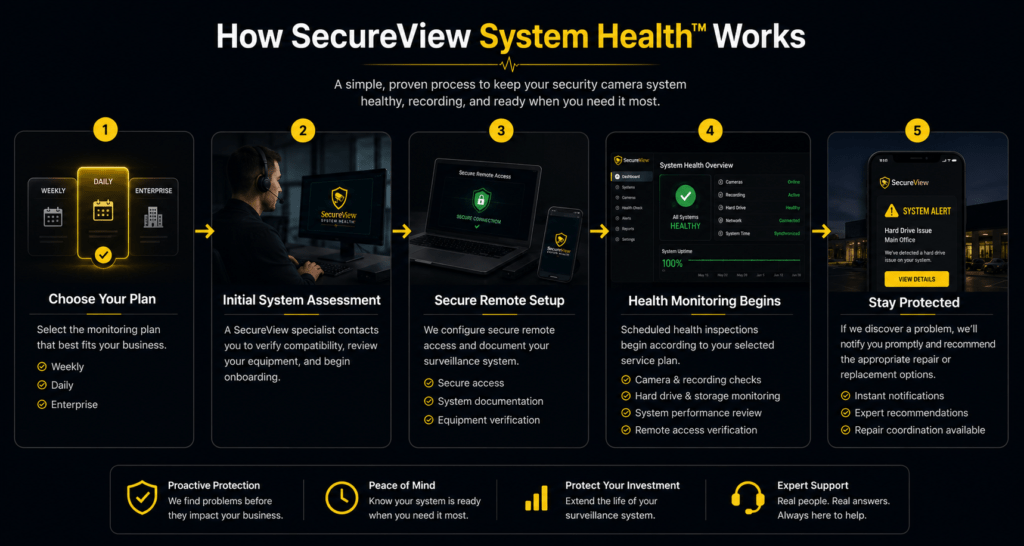
Getting Started Is Simple
Enrolling in SecureView System Health™ is quick and straightforward. Whether your security camera system was installed by SecureView or another company, we’ll guide you through the onboarding process and begin proactively monitoring your surveillance infrastructure.
1. Choose Your System Health™ Plan
Select the monitoring plan that best fits your business. Whether you need weekly health inspections or daily system oversight, every plan is designed to help keep your surveillance system operating reliably.
Available Plans
✔ Enterprise Multi-Site Management™
2. Complete Your Secure Enrollment
After placing your order, a SecureView surveillance specialist will contact you to begin your complimentary System Health™ Initial Assessment.
During onboarding, we’ll gather the information needed to securely manage your surveillance system and answer any questions you may have about the service.
3. Initial System Health™ Assessment
We’ll remotely review your existing surveillance system to verify compatibility and document its current condition.
Depending on your equipment, the assessment may include:
✔ Recorder verification
✔ Camera connectivity review
✔ Recording status verification
✔ Hard drive health review
✔ Remote access configuration
✔ System documentation
If we identify any issues that require attention before monitoring begins, we’ll explain your options and provide recommendations before performing any additional work.
4. Health Monitoring Begins
Once onboarding is complete, SecureView begins performing scheduled health inspections based on your selected service plan.
During each inspection, we may verify:
✔ Camera connectivity
✔ Recording status
✔ Hard drive health
✔ Storage capacity
✔ Recorder availability
✔ System time synchronization
✔ Remote access functionality
Our goal is to identify system issues before they affect your ability to retrieve important video footage.
5. We Notify You When Something Needs Attention
If a scheduled health inspection identifies a problem, we’ll promptly notify your designated contact and explain the issue in plain language.
Many issues can be resolved remotely. If replacement equipment or on-site service is recommended, SecureView can coordinate the repair and provide a clear quote before any work is performed.
Our mission is simple:
Keep your surveillance system healthy so it’s ready when you need it most.
Ready to Get Started?
Choose the SecureView System Health™ plan that best fits your business and let us help keep your surveillance system operating at its best.
Is Your Existing Security Camera System Compatible?
Find Out With a Free SecureView System Health™ Assessment
Your business may already have a security camera system—but that does not necessarily mean someone is verifying that it remains online, recording, and ready when you need it.
SecureView can evaluate many existing security camera systems, including equipment installed by other companies. Our compatibility assessment helps determine whether your cameras and recorder can be securely accessed for scheduled remote system-health inspections.
There is no obligation to replace your existing equipment or enroll in a service plan.
Takes approximately three minutes. No purchase required.
What We Evaluate
Your free compatibility assessment helps us understand your current surveillance system and whether it can support remote health-management services.
We will evaluate available information concerning:
- Recorder manufacturer and model
- Camera manufacturer and model, when known
- Number of cameras and recorders
- Current remote-access capabilities
- Internet and network availability
- Recording configuration
- Hard-drive and storage setup
- Existing mobile or desktop application
- Number of business locations
- Current system problems or concerns
Depending on the system, we may request photographs of the recorder, system-information screen, or mobile application.
What Happens After You Submit the Assessment?
1. Tell Us About Your System
Complete the short assessment form with the information you know. It is okay if you do not know every technical detail.
2. SecureView Reviews Your Equipment
A surveillance specialist reviews your system information and determines whether remote health checks are technically possible.
3. Receive Your Compatibility Results
We will let you know whether your system appears compatible, whether additional information is required, or whether an initial remote or on-site service is recommended.
4. Choose Whether to Continue
Compatible businesses can select a SecureView System Health™ service plan. Enrollment is optional, and repairs or equipment replacements are quoted separately.
You Do Not Need SecureView Equipment
SecureView System Health™ is not limited to systems originally purchased from or installed by SecureView.
We may be able to support compatible systems from established surveillance manufacturers when the recorder provides suitable remote-management capabilities and the customer can authorize secure access.
Compatibility depends on factors such as:
- Recorder model and age
- Available administrative permissions
- Remote connectivity
- System condition
- Manufacturer support
- Required desktop or mobile software
- Cybersecurity and access requirements
Submitting the assessment does not guarantee compatibility. SecureView will confirm eligibility after reviewing the system.
What SecureView System Health™ Is Designed to Check
When a compatible business enrolls, scheduled inspections may include verification of:
- Camera connectivity
- Recorder availability
- Recording activity
- Hard-drive condition
- Storage status
- System date and time
- Remote-access functionality
- Visible image-quality issues
- System alerts and error conditions
SecureView manages the health of the surveillance infrastructure. We do not continuously watch live footage, verify crimes, provide alarm monitoring, or contact emergency services.
Common Warning Signs Your System Needs Attention
Request an assessment when:
- Nobody has checked the recorder recently.
- You are unsure whether footage is being saved.
- One or more cameras occasionally disappear.
- The installer is no longer available.
- The mobile application no longer connects reliably.
- The system produces frequent false alerts.
- You have never reviewed the hard-drive status.
- The recorder date or time is incorrect.
- Your business has multiple locations without centralized oversight.
- You only discover camera problems after an incident.
Even when the live camera view appears normal, the system may still have a recording or storage problem.
Who Should Request an Assessment?
This service is designed primarily for businesses and organizations that depend on recorded surveillance footage, including:
- Restaurants
- Retail stores
- Warehouses
- Offices
- Medical practices
- Churches
- Apartment communities
- Property-management companies
- Auto repair facilities
- Manufacturing businesses
- Schools and childcare facilities
- Multi-location businesses